
Free Transcription Software: Genscriber & Transcript
(by Nancy Cutway)
November 2022
Staying “inside” over the past three years has given me a lot of time to watch online webinars and videos, to improve my knowledge of genealogical research practices. A webinar I watched recently stressed the importance of transcribing every original document you receive, so that you don’t miss out on important wording.
The transcription method I’ve used up to now has been fairly primitive: printing out the image of the document and placing it on a small stand to the right of my screen and looking back and forth from the paper document to the screen as I type into a word processor – a very good generator of neck strain headache, and of the high possibility of skipping a line in error.
During the webinar mentioned above, the speaker recommended two FREE pieces of software that make the process of transcribing a document much easier:
- Genscriber is available from https://genscriber.com/en/ for both Windows and Mac. It lets you use several different entry formats, so that you can have a census image above a blank table form that you’re filling in to match census information, for example. I haven’t yet tested it out.
- Transcript 2.6.0 is available from https://www.jacobboerema.nl/en/Freeware.htm. It comes in both free and Pro versions. Do read the details on the home page, to determine which is right for you. For most of us, the free version should be sufficient for personal use for occasional documents.
I tested out Transcript first. The document has to be in *.jpg format, although apparently the Pro version can deal with *.pdf documents.
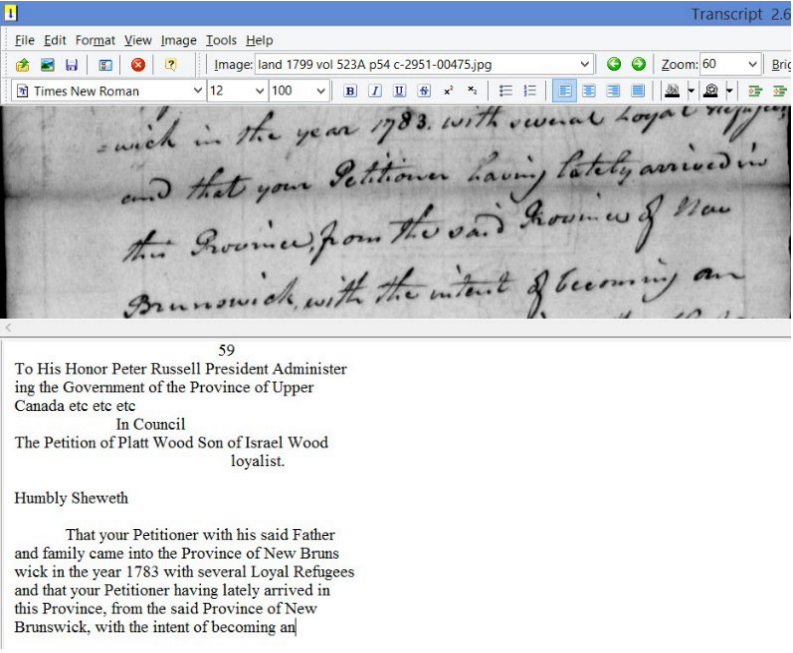
Here’s an example of a screen when using Transcript. First you open an imagefile, as the software calls it. You can see the name of the image file centred above the handwritten bit (my filename should probably include the name of the person it concerns, but I do have the files I downloaded from Library and Archives Canada in a folder named “Platt Wood.”). You can zoom the image as large or small as you want.
As you type in the lower box, you have to press “Enter” at the end of each line so your text exactly matches the wording in the image. As you do that, the focus on the image file moves down a line, presenting a new line at the bottom and keeping your entry box in sync with the image.
Your transcripts are saved in *.rtf format, and can later be used with other editors such as Word, OpenOffice, Libre or WordPerfect. I haven’t yet tested GenScriber but I’m sure it works similarly.
When you transcribe a document, it makes you read every word. You then pay more attention to things like witnesses on land documents and wills: ask yourself if they are connected to the principal person, or just the lawyer’s clerk. And no more strain on your neck as you transcribe!