
Using Find-A-Grave for Family Research
(a talk by Brian Shannon)
September 26, 2020 – Newsletter Issue #5
Brian Shannon, who has strong Acadian and Loyalist roots, retired to Amherstview from Nova Scotia in 2016. Despite his roots being in Nova Scotia, his family has a connection to Kingston. Brian’s father trained here before going overseas during World War II, his uncle Walter lived here for many years, and his son Colin went to RMC and married a Kingston girl. Brian is a member of the board of the Heritage Cemetery at Cataraqui (formerly known as Cataraqui United Church Cemetery).
Brian has been doing genealogy for about 23 years, and joined the website findagrave.com about four years ago. As he explained, Findagrave is free to everyone to use without joining or signing in. However, if you do join the site (also free), you can then do things like submit corrections to memorial information, create memorials for people not yet found on the site, and upload photographs of tombstones.
Brian’s presentation began with a short video recorded at the September 12th commemoration of War of 1812 veterans buried in the Heritage Cemetery at Cataraqui (see previous article). Brian has been photographing stones in the cemetery for the past couple of years and uploading them to Findagrave. This can benefit people around the globe who may be related to an individual buried in a cemetery far from them, but can thus see the tombstone and other information.
A Findagrave memorial entry generally consists of birth and death dates for an individual, burial place, and perhaps links to other family members. These linkages do not happen automatically, but you can create them yourself if you’re a member. You can “own” one or more memorials; many have been created by volunteers living near a cemetery who have no connection to the person and are usually happy to turn over ownership to a relative upon request. The memorial may have a photograph of the tombstone, and perhaps of the person if someone has uploaded one. There can be links to an individual’s parents, siblings and children. One memorial entry can lead you to many more family members. Some memorials include additional information if added by the contributor, such as a newspaper obituary, marriage date, etc.
You can search Findagrave for memorials by name of the individual, or by geographical area.
Brian pointed out a memorial where he had left “a flower” on a date in 2018. This flower remains on the site forever, and might serve in future to inform a site visitor that Brian is also interested in this individual and may be a relative of the visitor as well.
Brian then discussed the Findagrave app, available for use on a smartphone (also free, from either the Apple store or Googleplay). The app provides exactly the same access you get to the website on a desktop computer, with a few bonuses: because a smartphone has GPS ability, you can use it to direct you to the exact location of a specific grave. Brian played a short video he’d recorded, showing him typing in the name of a cemetery (St. Linus in Bath, Ontario) and being directed by the GPS how
to drive from his home to the cemetery. He then walked over to a tombstone not hitherto shown on Findagrave.
In the video, Brian took a photo of the tombstone on his phone. He also typed into the Findagrave app the person’s name and dates (read off the stone) and the name of the cemetery. He uploaded that entry to Findagrave, and we could then see that it was now on the website. The upload captured the GPS information associated with the stone. So now a person looking for the stone could use their own phone and the app and be guided right to the correct stone. This would obviously be of really great benefit when hunting for stones in larger cemeteries – thinking of Cataraqui Cemetery, across the road from the Heritage Cemetery at Cataraqui, which covers 91 acres and has well over 40,000 burials. (Note: your phone needs to have data access turned on in order to access Findagrave in the cemetery.)
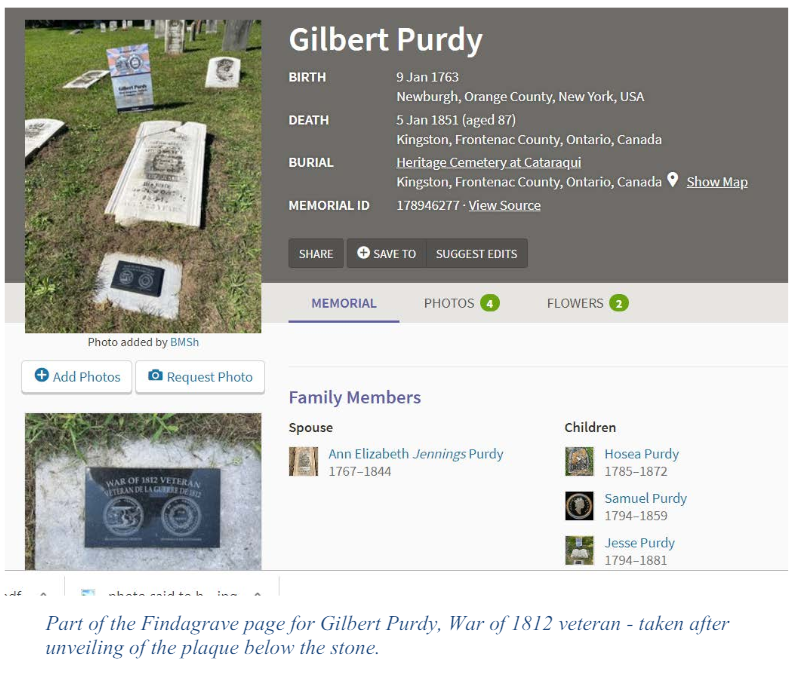
Finally, Brian discussed “virtual cemeteries” in Findagrave. As well as providing public linkages among the stones of various family members, you can create a Virtual Cemetery that contains anyone you’d like to associate with other individuals. For example, Brian has created a Virtual Cemetery for the eight War of 1812 soldiers commemorated September 12th. Yes, they all rest in the same cemetery, but because they are not related to each other, they could not be linked as family members can; but creating a virtual cemetery for War of 1812 soldiers means that other veterans buried elsewhere in Canada could be added to the same War of 1812 Veteran Virtual Cemetery. Virtual cemeteries may only be accessed from the Profile page of the Findagrave member, who can control whether anyone else can see them. It can make a convenient way to group people from various family lines in one place for future reference.